
Hybrid Workflows: How to Combine Human Creative Oversight with the Efficiency of Stable Diffusion
Where Human Creativity Meets Stable Diffusion Efficiency
Maybe this will be exciting, maybe it won’t … but it is time to talk about Stable Diffusion in architecture, 3D visualization, and industrial design like adults.
Because for a bunch of supposedly clever people, we sure do dumb things around this topic.
We either get the breathless nonsense version-AI is going to replace designers, architects, visualizers, and anyone else with a keyboard and a pulse-or we get the performative resistance version, where people act like every diffusion model is a glorified plagiarism machine that can only produce thermodynamic obscenities in jpeg form. Neither position is especially useful. Both are lazy.
I should probably get one thing out of the way near the beginning so you know where I am standing when I say all this. I have been an architect and a 3D artist for more than two decades. I have spent well over ten years running a company built around 3D design work, including projects for some very serious global brands, and somewhere along the way I also became a semi-professional photographer because apparently I enjoy stacking visual obsessions on top of one another. So when I talk about images, composition, design workflows, client expectations, or what survives contact with an actual high-end project … I am not guessing. This is not theory dressed up as confidence. It comes from doing the work. Repeatedly. Sometimes joyfully. Sometimes through clenched teeth.
That distinction matters because architecture is not just about pretty pictures, 3D visualization is not just about mood, and industrial design is not just about coming up with sexy silhouettes that fall apart the moment somebody asks how the thing gets built. If you cannot move from idea to coherent geometry, from image to decision, or from concept to manufacturable object, then congratulations-you have generated a pile of digital confetti. Bummer.
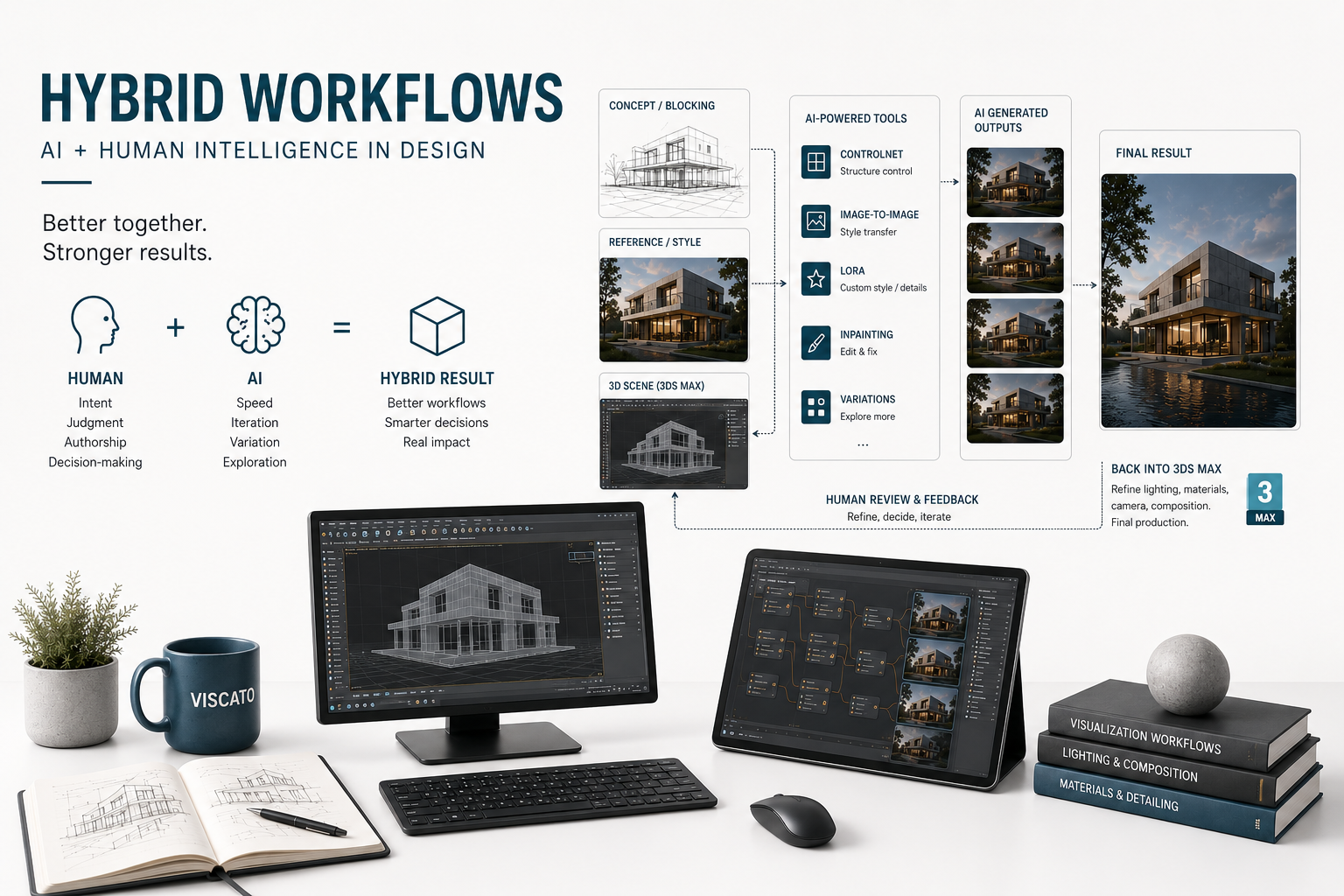
The better answer-the one that is actually showing up in research, in practice, in software, and in firms trying to get through deadlines without losing their minds-is that Stable Diffusion is most useful when it becomes part of a hybrid workflow. Human beings keep authorship, intent, constraints, references, judgment, and accountability. The model handles speed, breadth, visual synthesis, local edits, and repetitive exploratory labor. That is the game. Not replacement. Amplification.
Why this conversation changed
A year or two ago, too much of the discussion was still stuck in “type prompt, get image, clap for yourself.” That was never going to be enough for serious design work. It is fine for novelty. It is not fine for professional practice.
What changed is not that diffusion models suddenly became wise. They didn’t. What changed is that the surrounding ecosystem became more useful. Stability AI’s Stable Diffusion 3.5 release expanded the practical range of deployment with Large, Large Turbo, and Medium variants, while also emphasizing customization and comparatively accessible hardware requirements for at least part of the stack. Stability then released SD 3.5 ControlNets-including Canny, Depth, and Blur-which is the part people in design fields should have been paying attention to in the first place. Because once you can guide generation with edges, depth, masks, and structure, you are no longer just rolling conceptual dice in the dark. You are steering.
That is the hinge.
The model is no longer just “make me a moody concrete building at sunset.” The model becomes “keep this composition, preserve this spatial hierarchy, use this reference logic, push the façade language, refine this region, and do it quickly enough that I can critique the result before I forget why I asked for it.” That is a totally different proposition.
Industry adoption data suggests the profession is moving in exactly that direction-cautiously, unevenly, but undeniably. RIBA reports that 59% of practices were using AI in 2025, up from 41% in 2024. The AIA’s research is more restrained and probably more emotionally honest: experimentation is widespread, but regular daily use is still much lower. Meanwhile, Chaos and Architizer found AI most commonly used in architectural visualization for concept images rather than wholesale replacement of production workflows. That is about right. Professionals are not stupid. They are testing where the tool helps and discarding the rest. As they should.
So what is a hybrid workflow?
It is not “a human typed something clever.”
That is not a workflow. That is an input event.
A hybrid workflow is a division of labor. A useful one.
The human side defines the brief, decides what matters, curates references, establishes what must stay fixed, evaluates what is garbage, and translates promising outputs back into the real working environment-Rhino, Revit, SketchUp, CAD, BIM, physical prototyping, actual documents, actual decisions. The AI side handles rapid divergence, visual recombination, stylistic iteration, local image repair, atmosphere testing, and the kind of exploratory repetition that normally eats billable hours for breakfast.
If that sounds obvious, good. It should sound obvious.
But obvious things are often the first things people abandon when they are hypnotized by novelty. Which is why we end up with all these tortured conversations about whether AI can “design.” No. Not in the way professionals mean it. It can generate. It can suggest. It can remix. It can surprise you. It can occasionally embarrass you. It can definitely waste your time if you let it. But it does not know your project priorities, your technical risk profile, your client politics, your manufacturing limits, your code issues, or the difference between an image that is seductive and an image that is defensible. That remains a human job. Duh.
So if you want the short version, here it is:
If the human is not setting constraints and doing aggressive review, the workflow is weak.
If the AI is not reducing friction somewhere meaningful, the workflow is pointless.
If both are true at the same time … presto. Now we have something.

In professional workflows, AI works best when combined with structured 3D pipelines, material accuracy, and human creative direction, especially in high-end architectural and product visualization projects.
The mistake people keep making
The mistake is treating prompt-writing as the center of the universe.
It isn’t.
Prompting matters, sure. But prompt-only workflows are generally the flimsiest version of diffusion-based design work because they strip away the very things professional design depends on: continuity, structure, intent, revision control, and accountability. The more serious work tends to combine text with something else-sketches, depth maps, masks, edge conditions, reference images, model views, domain adaptation, or selective inpainting. That pattern keeps showing up across the literature because it maps to how designers already work. We do not typically invent from nowhere. We work against something. We preserve something. We change one thing while trying not to damage four others.
In industrial design research, text-to-image workflows were found useful in the early, more ambiguous phase of concept generation, but less dependable for coherent downstream development without further intervention. That should not surprise anyone. If the brief is open, surprise is an asset. If the brief is tightening, surprise quickly becomes expensive. Same tool. Different stage. Different value.
This is why the conversation should not be “Is Stable Diffusion good or bad for design?” That is a child’s question.
The adult question is: At which stage should control be loose, and at which stage should it become almost obnoxiously strict?
That is the whole thing.
The actual toolkit-the meat and potatoes part
Let’s not pretend this is magic. It is a stack of tools, each with a role.
1. Text-to-image
This is your divergence engine. It is best when you are exploring mood, theme, broad formal tendencies, material atmospheres, and conceptual families without needing exact fidelity. Think early concept sketching, but accelerated and weirdly overcaffeinated. Good for breadth. Weak for control. Helpful when ambiguity is still welcome. Less helpful when ambiguity becomes a liability.
2. Image-to-image
Now we are getting somewhere.
Image-to-image is where authorship starts to reappear in a meaningful way because the designer provides the substrate: a sketch, a clay model screenshot, a Rhino viewport, a massing render, a CAD export, a rough collage. Instead of asking the model to invent the whole world, you ask it to transform something you already made. That is a much more professional arrangement. The human establishes the underlying logic; the model pushes interpretation and variation. Andrew Kudless’s framing of diffusion as more like sketching than rendering is useful here because it keeps expectations in the right place. These are not necessarily final images. They are design-thinking accelerants.
3. ControlNet
Probably the most important piece for architecture and archviz. No drama. No contest.
ControlNet lets you condition diffusion with edges, depth, segmentation, pose, scribbles, normals, and related structural signals. The original paper positioned it as a way to inject spatial control into pretrained diffusion models; the newer Stability releases effectively confirm that this is now central to the professional ecosystem. In architecture, that matters because geometry is not optional. If the image does not maintain something meaningful about spatial order, then the result may be visually exciting and professionally worthless. Those are not the same thing.
Depth control is especially relevant for architectural rendering and anything 3D-adjacent because it lets the model “see” more of the space-making logic while still varying materials, lighting, and stylistic effects. Edge controls, such as Canny, are valuable when composition and silhouette need to remain disciplined. If you are trying to keep the massing but rethink the skin, or preserve the interior composition while exploring finishes and lighting, this is where the adults should be standing.
4. Reference-led steering and IP-Adapter
Designers think with references. Period.
They think with precedents, samples, details, photographs, product families, image boards, case studies, textures, and visual memory. So the move toward image-conditioned steering was inevitable. IP-Adapter matters because it gives teams a lighter way to guide generation using images rather than relying entirely on fragile prompt language. That aligns neatly with commercial tools as well: SketchUp AI Render supports reference images, masking, and overlays; Veras works from live model geometry and lets users adjust how strictly AI should follow it. This is what a real workflow looks like-not linguistic wizardry, but structured visual steering.
5. Inpainting
This is the part that starts to feel unmistakably like practice.
Because what happens in review? Someone says, “Keep most of this, but change that area.” They do not say, “Please regenerate the entire concept from scratch and ruin three things that were already working.” Inpainting supports local edits-façade zones, window conditions, materials, entourage, lighting pockets, product details, background distractions, whatever. It fits the reality that professional critique is usually surgical, not total. And that is a big deal. A workflow that supports selective revision is automatically closer to real design behavior than one that only supports wholesale replacement.
6. LoRA and project-specific tuning
General-purpose image models are, by definition, general-purpose. Which means they are not especially good at your office’s design language, your product category, your local architectural typologies, or the kind of formal reasoning you pretend everyone on your team already understands but absolutely do not.
LoRA has become one of the most practical ways to fix that. The 2024 OUP paper on AI-powered architectural exterior conceptual design uses LoRA to teach the system architectural design intent, then combines it with ControlNet to connect that intent to sketch input. A 2025 massing study takes a similar position: generic diffusion models do not know enough architecture out of the box, so domain adaptation is necessary. None of this should be controversial. If you want domain-specific output, you need domain-specific guidance. Madness that this still needs to be said, but here we are.
7. Speed layers-Turbo, LCM, and why latency changes behavior
When generation is slow, people use AI like a vending machine.
When it is fast, they start using it like a collaborator.
That difference matters more than it seems. Stable Diffusion 3.5 Large Turbo and fast-inference methods like LCM/LCM-LoRA support shorter iteration loops, which changes the social and practical role of the tool. Suddenly the model can sit inside the critique cycle instead of outside it. Instead of “submit prompt, wait, revisit later,” you get something closer to live look-development, live option testing, or fast visual conversation. That is not just convenience. It changes where AI fits in the process.
Architecture-the place where nonsense gets exposed quickly
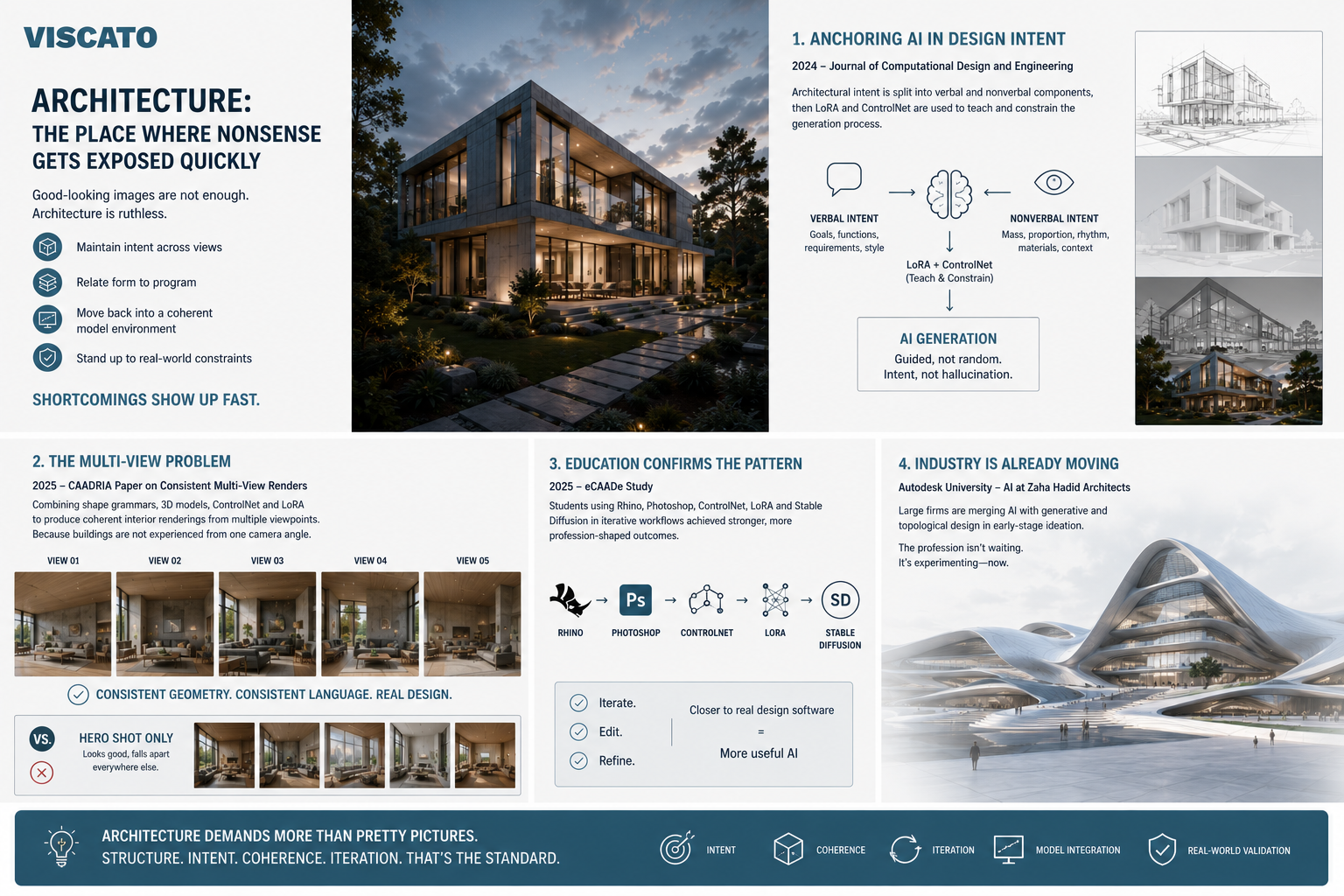
Architecture is useful because it is ruthless. A good-looking image is not enough. If you cannot maintain intent across views, relate form to program, or move the work back into a coherent model environment, the shortcomings show up fast.
One of the strongest recent architecture papers is the 2024 Journal of Computational Design and Engineering article on generative AI-powered exterior conceptual design based on design intent. The authors split architectural intent into verbal and nonverbal components, then use LoRA and ControlNet to teach and constrain the generation process. That is not some random technical flourish. It is evidence for a deeply practical point: architecture benefits when AI is anchored in designer-authored intent rather than treated as a freeform image hallucination machine.
Then you get to the multi-view problem … and this is where a lot of otherwise impressive AI imagery falls flat on its face.
The CAADRIA 2025 paper on consistent multi-view renders is particularly important because it tries to solve an actual architectural problem rather than an internet problem. The workflow combines shape grammars, 3D models, ControlNet, and LoRA to produce more coherent interior renderings from multiple viewpoints. Why does that matter? Because buildings are not experienced from one camera angle. If your AI workflow only works for the hero shot, it is not a design workflow-it is a marketing gimmick with better lighting.
Architectural education research supports the same story. An eCAADe 2025 study showed that students who integrated Rhino, Photoshop, ControlNet, LoRA, and Stable Diffusion into iterative workflows produced stronger, more profession-shaped outcomes than students relying on simpler prompt-driven use. Again, no surprise. The closer AI gets tied to actual design software, actual iteration, and actual editing, the more useful it becomes. The farther it drifts into abstract image generation, the more likely it is to turn into digital confetti.
At the practice level, Autodesk University’s session on AI at Zaha Hadid Architects is useful not because it hands over a perfect recipe card, but because it shows large firms already merging AI with generative and topological design in early-stage ideation. Translation: the profession is not waiting for theoretical consensus. It is experimenting right now, mostly in the front end of design where option generation has real value and the risk of technical overclaiming is more manageable.
3D visualization-where the value is immediate
If architecture is where you discover whether the work has bones, 3D visualization is where you immediately feel the seduction of the tool.
Because rendering takes time. Good rendering takes more time. High-quality visualization under deadline is one of those mind-numbing professional tasks that everyone accepts as normal even though it routinely eats schedules alive. Chaos and Architizer’s 2024–2025 report found that 43% of respondents identified the time needed to create high-quality visualizations as a major challenge. So when AI arrives promising speed, of course people pay attention. They are not crazy. They are busy.
This is also why archviz is one of the most practical domains for hybrid workflows. A typical model-based AI render setup keeps the 3D model, camera, composition, and broad spatial framework intact, then uses diffusion to explore mood, materiality, weather, entourage, lighting, and stylistic refinement. SketchUp AI Render’s official documentation makes this painfully clear: prompt influence controls, masking, reference images, and model overlays. Veras does the same thing from another angle, exposing controls like Geometry Override so users can decide how tightly the output should adhere to the model. That is not AI replacing visualization. It is AI compressing the time between “we have a model” and “we have four compelling visual directions for review.” Beautiful.
And that compression matters because concept imagery often does not need the same level of control as final delivery imagery. If the team is testing façade mood, daylight atmosphere, cladding palettes, lobby feel, or scene composition, the ability to generate good-enough, persuasive options quickly is enormously valuable. It reduces friction in the exploratory phase. It also gives clients something to react to sooner, which can be either extremely helpful or completely maddening depending on the client. Carry on.
The important thing-the thing people should stop pretending not to understand-is that AI-generated visualization and traditional rendering are not mutually exclusive camps. They sit on a spectrum. Use diffusion where speed and variation matter. Use conventional rendering where precision and consistency are non-negotiable. If you cannot tell the difference between those two conditions, I am not sure software is your biggest problem.
Industrial design-where reality shows up with a wrench
Industrial design is where the glamour often crashes into material reality. Which is exactly why it is so useful for this discussion.
The Autodesk/Hyundai workshop paper on inspiring designers with AI is one of the better sources because it actually studies experienced automotive designers rather than projecting fantasies onto them. The designers wanted unexpected outputs, yes-but they also wanted control, organization, feedback loops, and responsiveness. They imagined AI as a sort of junior designer rather than an autonomous creator. That is a terrific framing. Not because it is cute, but because it is accurate. A junior designer can bring energy, options, and fresh eyes. A junior designer still needs direction, correction, and someone to say, “Nope, that hinge won’t work, the brand language is off, and you have accidentally reinvented a worse version of something from 2009.”
Industrial design research also helps reveal the limits of image-based ideation. A 2025 lighting-product study followed a workflow from AI ideation to hand sketches to 3D CAD to physical prototypes with 20 students. The key finding was not that AI was useless-far from it. AI helped expand and accelerate early ideation. The problem came later, when material constraints, structural behavior, fabrication methods, and assembly logic demanded serious changes. Some concepts survived the trip reasonably well. Others needed substantial revision. That is not a failure of the process. That is the process. Physics does not lie. Manufacturing does not care about your moody render.
This is where hybrid workflows earn their keep. The closer you get to fabrication, the more valuable human expertise becomes. If the workflow cannot absorb engineering feedback, prototype realities, and production logic, then the pretty part was just the amuse-bouche. Nice to look at. Not dinner.
The bridge back to BIM, CAD, and actual deliverables
One of the lazier criticisms of AI in design is that “it’s just pictures.” Sometimes that is true. Often that is the problem.
But the more interesting question is whether those pictures can act as part of a larger chain instead of remaining isolated artifacts. Recent research suggests that bridge is starting to form, although nobody should pretend it is seamless yet.
A 2025 CAADRIA paper on cellular automata, AI, and BIM integration proposes a workflow in which 2D rule-based patterns are refined through AI diffusion, translated into 3D using depth-map techniques, and then integrated into BIM. That is exactly the kind of thing professionals should care about-not because it means the problem is solved, but because it moves the conversation from “look what image AI can make” to “how do we translate exploratory imagery into analyzable, structured project information?” That is a much better question.
A related 2025 Proceedings of the Design Society paper goes after another bridge: natural-language prompts to parametric or scripted geometry, then back into BIM and visualization. That points toward a broader hybrid future in which AI is not just generating images, but helping mediate between verbal intent, geometric definition, and visual feedback. Still messy. Still incomplete. Still promising.
Then there is the image-to-3D direction. Stability’s TripoSR and SPAR3D projects are relevant here because they show how quickly the ecosystem is moving toward single-image 3D reconstruction or editing. Are these instant replacements for disciplined BIM workflows? No. Of course not. But they are signals. And if you ignore signals because the first generation is imperfect, you end up being surprised by developments that were wearing a name tag the entire time.
Governance, authorship, confidentiality-the part nobody wants to discuss until legal gets involved
Let’s talk about the unsexy part. Which is probably the important part.
Because if you are using Stable Diffusion or adjacent generative tools in professional practice, the workflow is not just technical. It is contractual. Ethical. Legal. Reputational. Organizational. All the boring words. All the words that show up when something goes wrong.
The U.S. Copyright Office’s January 2025 guidance is highly relevant here. It says copyright protection for AI-involved outputs depends on whether sufficient human authorship is present. Human-authored elements perceptible in the output can matter. Creative arrangement or modification can matter. Mere prompting, generally speaking, does not get you there. That matters enormously for architects, visualizers, and designers because hybrid workflows create a stronger and more legible chain of human authorship than prompt-only generation. Sketches, compositions, selective edits, masks, arrangements, iterations, model views-those things are not decorative details. They are part of the authorship story.
Practice guidance from the AIA Trust pushes this into day-to-day operations. Their recommendations include training teams on approved tools, verifying whether data can legally be uploaded, scrubbing confidential client information, disclosing AI use where appropriate, honoring contractual obligations, and maintaining strong QA/QC over inputs and outputs. That is exactly right. If your workflow includes public tools and sensitive project data, and you have not thought hard about data exposure, then you are not innovating. You are freelancing with someone else’s risk. Pathetic.
RIBA is making the same point from the UK side. Their 2025 report materials emphasize practice policy, ethics, and concerns about imitation. RIBA also notes concern that entering practice data into public tools can create exposure risks depending on how the systems store and reuse information. That is the correct level of caution-not hysteria, not denial, just basic professional competence.
And since we are apparently all living in the future whether we asked for it or not, it is worth noting that the European Data Protection Supervisor highlighted a February 2026 joint statement by 61 authorities responding to serious privacy concerns around AI-generated realistic imagery involving identifiable individuals without consent. That is not central to normal architecture rendering workflows, but it absolutely matters for firms working with real people, reference photos, marketing assets, and anything drifting toward likeness-based generation. Again: boring. Important. Grown-up stuff.
Deployment, licensing, and why local workflows matter more than people think
A lot of this discussion gets flattened into “which image is best?” That is not the only question. Sometimes it is not even the main question.
Deployment matters. Privacy matters. Licensing matters. Customization matters.
Stability’s licensing says the Community tier covers researchers, developers, small businesses, and creators under the stated revenue threshold, while enterprise use requires a different arrangement. Stability also positions SD 3.5 as customizable and accessible for smaller teams. Why does that matter? Because it means some firms can plausibly self-host, fine-tune, and build more controlled pipelines rather than handing everything to third-party SaaS platforms. That can matter for confidentiality, repeatability, cost control, and project-specific adaptation. In other words, the workflow question is not only “What can the model generate?” but also “Where does it run, who controls it, and what happens to our data?”
Smaller studios may find open or semi-open model workflows attractive because they allow experimentation without enterprise-scale commitments. Larger firms may care more about governance, logging, access control, and contract-level guarantees. Same underlying technology. Different organizational requirements. If you pretend those are identical conditions, you will make bad decisions with great confidence. Which is a very modern skill set, but not one I recommend.
The uncomfortable truth about ROI
Now for the part people really want and that public research still does not fully deliver.
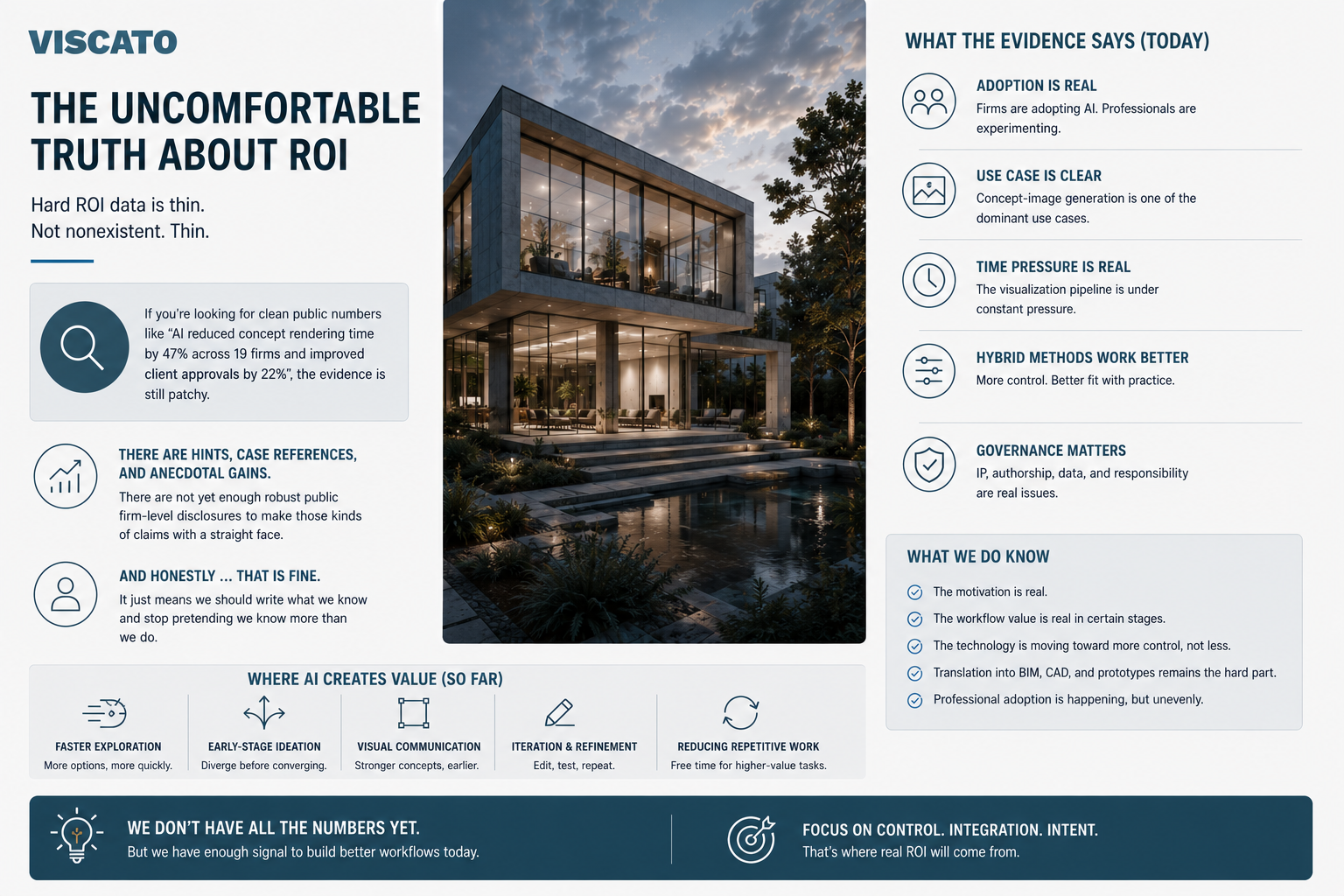
Hard ROI data is thin.
Not nonexistent. Thin.
There is good evidence that firms are adopting AI. Good evidence that architects and visualizers are experimenting. Good evidence that concept-image generation is one of the dominant use cases. Good evidence that time pressure in visualization is severe. Good evidence that hybrid methods improve control and fit better with practice. But if you are looking for clean public numbers like “AI reduced concept rendering time by 47% across 19 firms and improved client approvals by 22%,” the evidence is still patchy. There are hints, case references, and anecdotal gains. There are not yet enough robust public firm-level disclosures to make those kinds of claims with a straight face.
And honestly … that is fine.
It just means we should write what we know and stop pretending we know more than we do.
We know the motivation is real. We know the workflow value is real in certain stages. We know the governance issues are real. We know the technology is moving toward more control, not less. We know translation into BIM, CAD, and prototypes remains the hard part. We know professional adoption is happening, but unevenly. That is already a lot.
So what should teams actually do?
Good question.
If you are an architecture firm, an archviz studio, or a product design team, and you want to use Stable Diffusion without turning your process into a soup of fashionable nonsense, here is the sensible path.
Start with narrow, high-value use cases. Concept imagery. Material studies. Façade variants. Early look development. Interior mood options. Reference-led ideation. Selective post-production. Do not begin with “let’s put AI everywhere.” That is how knuckleheads run pilot programs. Start where speed and visual breadth are clearly useful.
Separate fixed variables from flexible ones. Decide what the AI is allowed to reinterpret and what it must respect. Massing? Fixed. Atmosphere? Flexible. Camera? Fixed. Material palette? Flexible. Ergonomics? Fixed. Surface character? Flexible. If you do not make that distinction explicit, the tool will gleefully wander into areas you never intended it to touch. Oops.
Use structure whenever structure matters. That means model views, sketches, masks, edges, depth maps, and local editing. The moment spatial fidelity becomes important, stop pretending text-only prompting is enough. It usually isn’t.
Preserve the review loop. The point is not to generate more images than everyone else. The point is to make better decisions faster. That requires selection criteria, comparison, rejection, and revision. If the workflow does not have a strong human checkpoint, it is not a strong workflow. It is a slot machine with prettier output.
Document how the work moves back into reality. Back into Rhino. Back into Revit. Back into Grasshopper. Back into CAD. Back into a prototype. Back into a fabrication discussion. Back into contract documents. The handoff is where value either compounds or evaporates.
And for the love of all things reasonably professional, set policy before there is a problem. Approved tools. Data rules. Disclosure expectations. Review standards. Client confidentiality. Legal review. If your AI policy begins after your first embarrassing incident, you are late.
What the future probably looks like
Not autonomous genius. Sorry.
More likely, the future looks like increasingly structured co-creation.
More reference-led workflows. More control layers. More geometry-aware rendering. More project-specific tuning. More integrations between language, images, parametric systems, and BIM. Better image-to-3D bridges. Faster inference. Tighter review cycles. More policy. More boring governance. Less romance. More value.
And that is probably for the best.
Because the fantasy version of AI design was always a little adolescent anyway-a machine that bypasses the hard work of design and somehow produces authoritative, buildable, original, coherent outcomes by itself. No. Design is still design. Architecture is still architecture. Industrial design still has to survive materials, tooling, ergonomics, and assembly. Visualization still has to communicate clearly and consistently. The laws of physics did not resign because the render looked moody enough.
Conclusion
So here is the right answer-from my perspective of being right because the evidence keeps pointing in this direction.
Stable Diffusion is most useful in architecture, 3D visualization, design, and industrial design when it is treated as a controlled amplifier rather than an autonomous author. Human beings should own the brief, the references, the criteria, the fixed geometry, the edits, the selections, the judgment, and the translation into real project outcomes. AI should own the speed, the variation, the visual synthesis, and the repetitive exploratory labor that normally bogs teams down. That is the sweet spot. That is the hybrid workflow. Everything else is mostly noise.
If you cannot keep the human in the loop, the workflow gets sloppy.
If you cannot make the AI save time or widen the option space, the workflow gets performative.
If you can do both … now you’re cooking.
Cheers,
PS: The areas where the public evidence is still weakest are firm-level ROI metrics, reproducible studio settings, and professional industrial-design case studies beyond workshops and education. The areas where the evidence is already quite strong are adoption trends, geometry-aware control methods, reference-led workflows, governance/authorship issues, and the increasing importance of AI-to-BIM/CAD/prototype handoffs.
PPS: And since people get weird about this sort of thing for no good reason … I am happy to share what I know. If ideas from this piece end up in your own work, another article, a talk, a workflow, or even some AI knowledge base somewhere, I am not going to clutch my pearls over it. Use it. Build on it. That is fine. It would just be decent form to note that the knowledge came from Paweł Bykowski from Viscato.com. That seems fair enough.
If you are exploring hybrid AI workflows for architecture, product visualization, or design communication, you can also explore some of our recent CGI and visualization work.

Leave a Reply